TooButtons
Плагин добавляет кнопки «Отправить» и «Закрыть» в окно беседы.
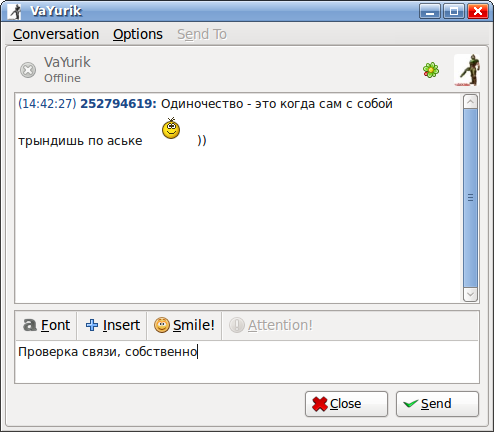
Настройки:
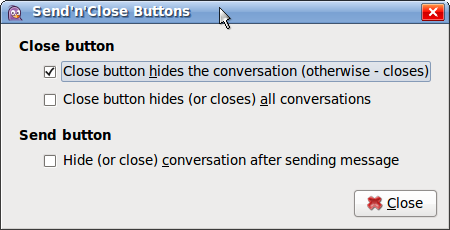
- Кнопка «Закрыть» закрывает или прячет окно беседы.
- Кнопка «Закрыть» закрывает (или прячет, в зависимости от настройки выше) все беседы.
- Кнопка «Отправить» после отправки сообщения может закрыть (или спрятать) окно беседы (или все окна, в зависимости от настроек выше).
Кнопка «Отправить» отключена, если в поле ввода текста отсутствует хотя бы один символ (т.е. если нечего отправлять).
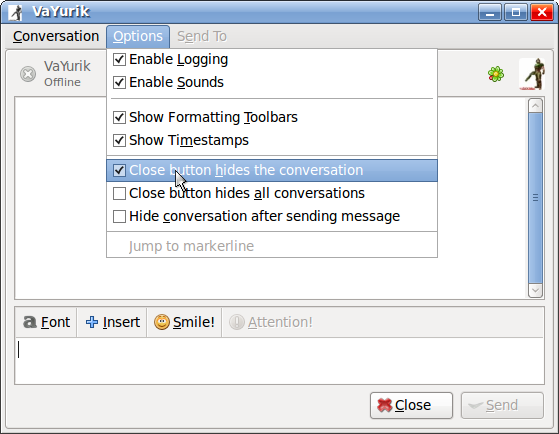
Настройки также доступны через меню окна беседы:
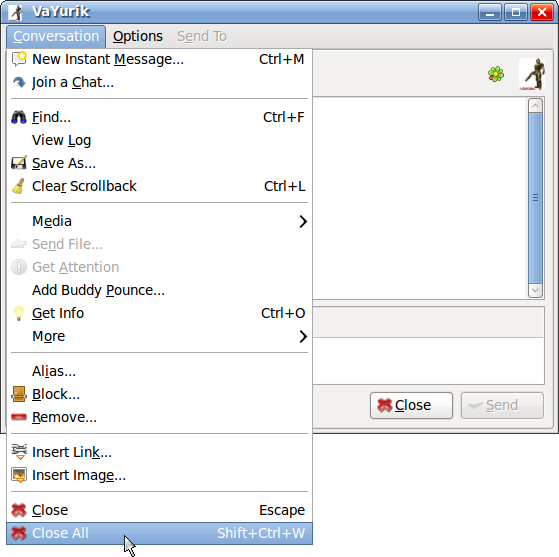
Также в меню «Беседа» добавлен ещё один полезный пункт — «Закрыть все» (Ctrl+Shift+W), который позволяет закрыть (или спрятать, в зависимости от настроек плагина) все открытые окна бесед:
Плагин базируется на коде другого плагина — Send Button (Кнопка отправки). По сути я лишь переформатировал в более удобочитаемый вид исходный код, ну и так, по мелочи добавил функционала 🙂
Текущая версия: 1.5
Совместимость: Pidgin 2.* для Linux/Windows.
Локализации:
- Английский (VaYurik)
- Русский (VaYurik)
- Чешский (Lukas Francalek)
- Немецкий (Siggi0904)
- Польский (Krystian Maksymowicz)
Известные ошибки:
- Отсутствуют.
Известные конфликты:
- С плагином ManualSize — поле для ввода текста может оказаться меньше, чем должно бы быть.
Лицензия: GPL.
Установка в Linux из исходников:
- Качаем архив pidgin-toobuttons-1.5.tar.gz (313 КБ);
- Распаковываем;
- Входим в директорию pidgin-toobuttons-1.5;
- Выполняем в консоли последовательно: ./configure, make, sudo make install;
- Запускаем (если запущен, то перезапускаем) Pidgin;
- Заходим в «Инструменты / Модули», в списке находим и включаем «Send’n’Close Buttons».
Удаление в Linux после установки из исходников:
- Закрываем Pidgin;
- Входим в директорию pidgin-toobuttons-1.5;
- Выполняем в консоли: sudo make uninstall.
Установка в Linux DEB-пакета:
- Качаем архив pidgin-toobuttons_1.5-1_i386.zip (10 КБ) или pidgin-toobuttons_1.5-1_amd64.zip (10 КБ);
- Распаковываем;
- Устанавливаем DEB-пакет;
- Запускаем (если запущен, то перезапускаем) Pidgin;
- Заходим в «Инструменты / Модули», в списке находим и включаем «Send’n’Close Buttons».
Установка в Windows:
- Качаем архив pidgin-toobuttons-1.5-win32.zip (31 КБ);
- Распаковываем в директорию, в которой установлен Pidgin (например, C:\Program Files\Pidgin);
- Запускаем (если запущен, то перезапускаем) Pidgin;
- Заходим в «Инструменты / Модули», в списке находим и включаем «Send’n’Close Buttons».
Список изменений:
Версия 1.5 09/08/11:
- Добавлен перевод на польский язык (Спасибо Krystian Maksymowicz).
Версия 1.4 11/04/11:
- Добавлен пункт меню «Закрыть все» в меню «Беседа»;
- Добавлена комбинация клавиш Ctrl+Shift+W для закрытия всех бесед;
- Настройка кнопки «Закрыть»: скрывать или закрывать беседу;
- Настройка кнопки «Закрыть»: скрывать (или закрывать) все беседы;
- Настройка кнопки «Отправить»: скрывать (или закрывать) все бесед(ы) после отправки сообщения;
- Настройка плагина возможна из меню «Параметры».
Версия 1.3 02/02/11:
- Добавлен перевод на немецкий язык (Спасибо Siggi0904).
Версия 1.2 22/09/10:
- Исправлены проблемы с отсутствием языков переводов после сборки пакета из исходников, а также установки из deb-файла;
- Добавлен перевод на чешский язык (Спасибо Lukas Francalek).
Версия 1.1 26/03/10:
- Версия под Windows;
- Исправлены скрипты для сборки пакета под Linux из исходников, в старой версии могла быть проблема с локализацией.
Версия 1.0 03/01/10:
- Первый публичный релиз.
Ссылки на страницы, на которых я публикую информацию об этом плагине:
Plugin adds «Send» and «Close» buttons to conversation window.
Options:
- Close button hides or close conversation.
- Close button hides (or closes) all conversations.
- Hide (or close) conversation (or all conversations) after sending message.
«Send» button is disabled if the text entry field is absent at least one character (ie if there is nothing to send).
Options now available through the menu «Options»:
Also in the «Conversation» menu added one more useful item — «Close All» (Ctrl+Shift+W), which allows you to close (or hide, depending on the settings of the plug) all open windows conversations:
The plugin is based on the code of another plug-in — «Send Button».
Current version: 1.5
Compatibility: Pidgin 2.* для Linux/Windows.
Translations:
- English (VaYurik)
- Russian (VaYurik)
- Czech (Lukas Francalek)
- German (Siggi0904)
- Polish (Krystian Maksymowicz)
Known bugs:
- None. Only not known:).
Known conflicts:
- With plugin ManualSize — text entry field may be smaller than it should be.
License: GPL.
Installing from source for Linux:
- Download pidgin-toobuttons-1.5.tar.gz (313 KB);
- Extract;
- Change folder to pidgin-toobuttons-1.5;
- Run in the terminal: ./configure, make, sudo make install;
- Start or restart Pidgin;
- Go to “Tools/Plugins”, enable «Send’n’Close Buttons».
Uninstall from source for Linux:
- Close Pidgin;
- Change folder to pidgin-toobuttons-1.5;
- Run in terminal: sudo make uninstall.
Installing from DEB-file for Linux:
- Download pidgin-toobuttons_1.5-1_i386.zip (10 KB) or pidgin-toobuttons_1.5-1_amd64.zip (10 KB);
- Extract;
- Install DEB-file;
- Start or restart Pidgin;
- Go to “Tools/Plugins”, enable «Send’n’Close Buttons».
Installing for Windows:
- Download pidgin-toobuttons-1.5-win32.zip (31 KB);
- Extract to the directory where you installed Pidgin (for example, C:\Program Files\Pidgin);
- Start or restart Pidgin;
- Go to “Tools/Plugins”, enable «Send’n’Close Buttons».
Changelog:
Version 1.5 09/08/11:
- Polish translation (thanks to Krystian Maksymowicz).
Version 1.4 11/04/11:
- Added menu item «Close All» to menu Conversation;
- Added hotkey Ctrl+Shift+W to close all conversations;
- Close button can be configured: to hide or to close conversation;
- Close button can be configured: to hide (or to close) all conversations or only current conversation;
- Send button can be configured: to hide (or to close) conversation(s) after sending message;
- Added items to Options menu to configure the plugin.
Version 1.3 02/02/11:
- German translation (thanks to Siggi0904).
Version 1.2 22/09/10:
- Fixed build script from source and deb-file — translations;
- Czech translation (thanks to Lukas Francalek).
Version 1.1 26/03/10:
- This version works under Windows too;
- Fixed scripts to build the package for Linux from source, in the old version could be a problem with localization.
Version 1.0 03/01/10:
- First Public Release.
Links to pages on which I publish information about this plugin:
Поддержите меня!
Свежие записи
Свежие комментарии
- к записи Новая версия патча-русификатора Yume Miru Kusuri. Теперь и с графикой.
- к записи Новая версия патча-русификатора Yume Miru Kusuri. Теперь и с графикой.
- к записи Новая версия патча-русификатора Yume Miru Kusuri. Теперь и с графикой.
- к записи Новая версия патча-русификатора Yume Miru Kusuri. Теперь и с графикой.
- к записи Новая версия патча-русификатора Yume Miru Kusuri. Теперь и с графикой.
Архивы
- Май 2020
- Декабрь 2019
- Июнь 2019
- Июль 2018
- Февраль 2018
- Сентябрь 2017
- Август 2017
- Июнь 2017
- Март 2017
- Январь 2017
- Декабрь 2016
- Январь 2016
- Декабрь 2015
- Ноябрь 2015
- Октябрь 2015
- Сентябрь 2015
- Август 2015
- Июль 2015
- Апрель 2015
- Февраль 2015
- Январь 2015
- Декабрь 2014
- Ноябрь 2014
- Октябрь 2014
- Сентябрь 2014
- Июль 2014
- Июнь 2014
- Февраль 2014
- Январь 2014
- Декабрь 2013
- Февраль 2013
- Январь 2013
- Июнь 2012
- Апрель 2012
- Март 2012
- Август 2011
- Июнь 2011
- Апрель 2011
- Февраль 2011
- Декабрь 2010
- Ноябрь 2010
- Сентябрь 2010
- Август 2010
- Июль 2010
- Июнь 2010
- Май 2010
- Апрель 2010
- Март 2010
- Февраль 2010
- Январь 2010
- Декабрь 2009